A sequence diagram is what you reach for when “service A calls service B” no longer provides enough detail. It shows who communicates, in what order, and what happens when the happy path stops being happy.
PlantUML turns that interaction into compact text. You name the participants, write messages from top to bottom, and let the renderer handle lifelines and spacing. That makes the result easy to revise, review in Git, and keep beside the behavior it explains.
Want to try the syntax first? Open the editable example below in Pumler, change a message, and watch the preview update. It is a small but complete PlantUML sequence diagram—no local setup or manual layout required.
@startuml
actor Customer
participant "Order API" as Orders
participant "Inventory service" as Stock

Customer -> Orders: Place order
Orders -> Stock: Reserve items
Stock --> Orders: Reservation confirmed
Orders --> Customer: Order accepted
@enduml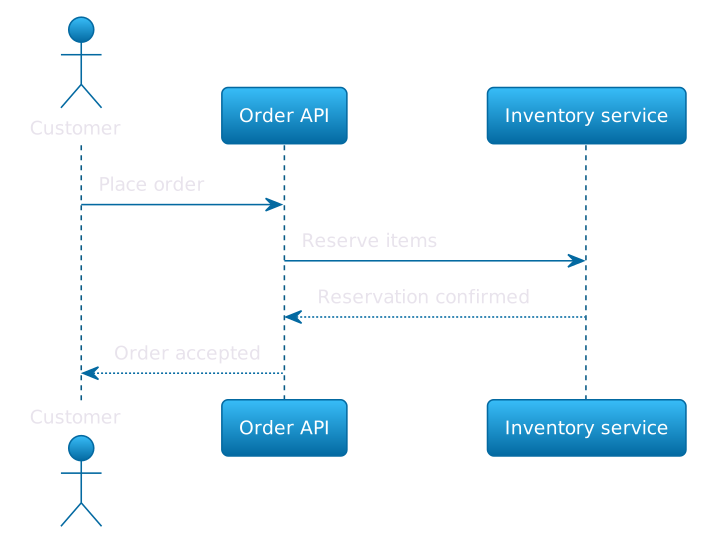
By the end of this tutorial, you will be able to declare participants and aliases, choose useful arrow styles, show activation bars, close the most recent activation with return, describe alternative/optional paths and loops. That is enough syntax for most API and service-flow conversations.
How a UML sequence diagram works
A UML sequence diagram puts participants across the top and gives each one a vertical lifeline. Messages appear as horizontal arrows. Their vertical position supplies the order: a message lower on the page happens after a message above it.
That sounds almost suspiciously simple, and that is the point. A sequence diagram is good at answering a narrow set of questions:
- Who starts the interaction?
- Which component owns each decision or side effect?
- In what order do calls and responses happen?
- Which alternatives, optional steps, or repeated steps matter?
- When does a participant actively handle a request?
It is less useful for showing a database schema, static dependencies, or exact deployment topology. Trying to smuggle all three into one sequence diagram usually produces a very accurate picture of nobody wanting to read it.
Every editable PlantUML diagram in this guide uses a complete envelope:
@startuml
' participants and messages go here
@enduml@startuml begins the diagram and @enduml closes it. Pumler preserves this standard PlantUML source in the editor and renders it as a sequence diagram.
Participants, actors, and aliases
PlantUML can infer participants from message lines, but explicit declarations are better for a maintained diagram. They fix the left-to-right order and make each role obvious before the first message appears.
Use actor for a person or external role and participant for a service, component, or other collaborator:
actor Customer
participant Checkout
participant PaymentNames with spaces need quotes. An alias gives that long display name a short identifier for later lines:
participant "Order API" as Orders
participant "Payment gateway" as Payment
Orders -> Payment: Create authorizationThe text in quotes appears in the diagram; Orders and Payment are the identifiers used in source. Aliases keep message lines readable and survive a display-name change without a diagram-wide rewrite.
Choose participant names at one abstraction level. Browser, Order API, and Payment service belong together. Button, Kubernetes cluster, and Finance department probably do not. If two names need a paragraph to explain why they share a diagram, the scope is already drifting.
Messages and arrow syntax
The basic PlantUML sequence diagram syntax for a message is:
Sender -> Receiver: Message labelThe colon separates the arrow from the message label. Prefer labels that describe intent—Reserve items, Authorize card, Load order — instead of vague labels such as Call or Request.
You will commonly see two right-pointing arrow styles:
Orders -> Stock: Reserve items
Stock --> Orders: Reservation confirmedThe solid -> style is commonly used for a request, while dotted --> is commonly used for a response. That is a visual convention, not semantics enforced by PlantUML. The renderer does not know whether a dotted message is a return, event, callback, or request. Your labels and team conventions carry that meaning.
Arrows can point left too. Reverse-arrow syntax makes the direction explicit when the sender is on the right:
actor Customer
participant Checkout
participant Payment
Checkout <-- Payment: Authorization result
Customer <-- Checkout: Order confirmedDo not write every low-level call simply because it exists. A useful sequence tells one story. If the question is how checkout handles payment failure, cache reads and metrics calls are probably noise unless they affect that outcome.
Activation bars: activate, ++, and return
An activation bar shows that a participant is actively executing or waiting within a call. PlantUML gives you explicit commands and compact message shortcuts.
The explicit form is straightforward:
Client -> Orders: Place order
activate Orders
' Orders is active here
deactivate Ordersactivate Orders opens an activation on the Orders lifeline. deactivate Orders closes that named activation. This form is readable when the active region spans several messages or when you want the source to state the lifecycle plainly.
The shorthand ++ activates the receiver on the same line as a message:
Orders -> Fraud ++: Check riskImportantly, ++ works independently of the arrow style. The shorthand pattern often described as --> ++ combines a dotted arrow with receiver activation; in a complete message, the receiver appears between them: Fraud --> Orders ++: Request order context. The dotted line still has no enforced “response” meaning.
@startuml
actor Client
participant "Order API" as Orders
participant "Fraud service" as Fraud

Client -> Orders: Place order
activate Orders
Orders -> Fraud ++: Check risk
Fraud --> Orders ++: Request order context
return Order context
return Risk approved
Orders --> Client: Order accepted
deactivate Orders
@enduml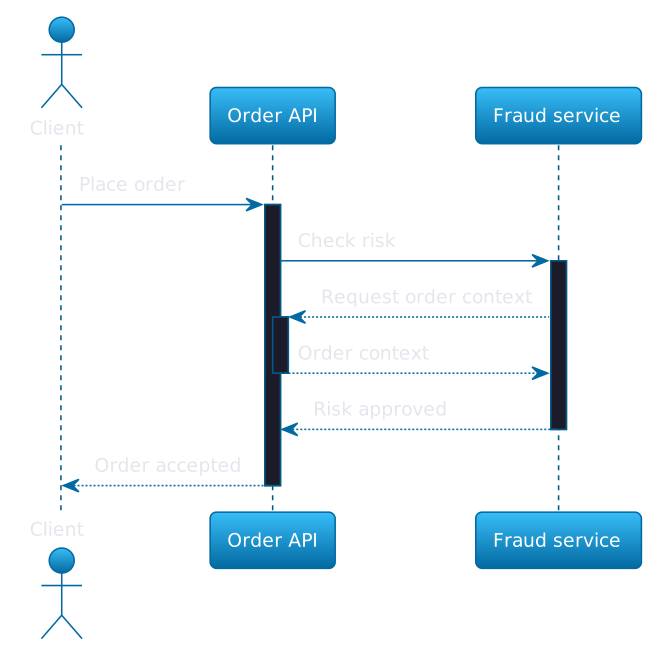
Follow the activation stack in order:
activate Ordersopens the outerOrdersactivation.Orders -> Fraud ++opens an activation onFraud.Fraud --> Orders ++opens a nested activation onOrders.- The first
returnsends a message back from the most recently activated participant and closes that nestedOrdersactivation. - The second
returncloses theFraudactivation and returns control to the earlierOrdersactivation. deactivate Orderscloses the remaining explicit activation.
In other words, return behaves like unwinding a stack: it targets the most recent open activation, adds the labeled return message, and closes that activation. It does not mean “send a response to whichever participant looks visually convenient.” With nested activations, the order matters.
PlantUML also recognizes -- as the shorthand that deactivates the sender on a message. It can make compact diagrams even shorter, but explicit return lines are often easier for beginners to trace because the response label and stack change appear in one readable statement.
Alternatives with alt and else
Real interactions branch. PlantUML represents mutually exclusive paths with an alt combined fragment:
alt payment approved
Payment --> Checkout: Authorization token
else payment declined
Payment --> Checkout: Decline reason
endThe text after alt and else describes the condition for each branch. Indent the messages inside each branch with four spaces. PlantUML does not require that whitespace, but consistent indentation makes the source much easier to scan and review.
Use alt when the paths compete: approved or declined, found or missing, authorized or rejected. Close the whole fragment with end.
@startuml
actor Customer
participant Checkout
participant Payment

Customer -> Checkout: Submit order
Checkout -> Payment: Authorize card

alt payment approved
    Payment --> Checkout: Authorization token
    Checkout --> Customer: Order confirmed
    opt email address provided
        Checkout --> Customer: Send receipt
    end
else payment declined
    Payment --> Checkout: Decline reason
    Checkout --> Customer: Payment failed
end
@enduml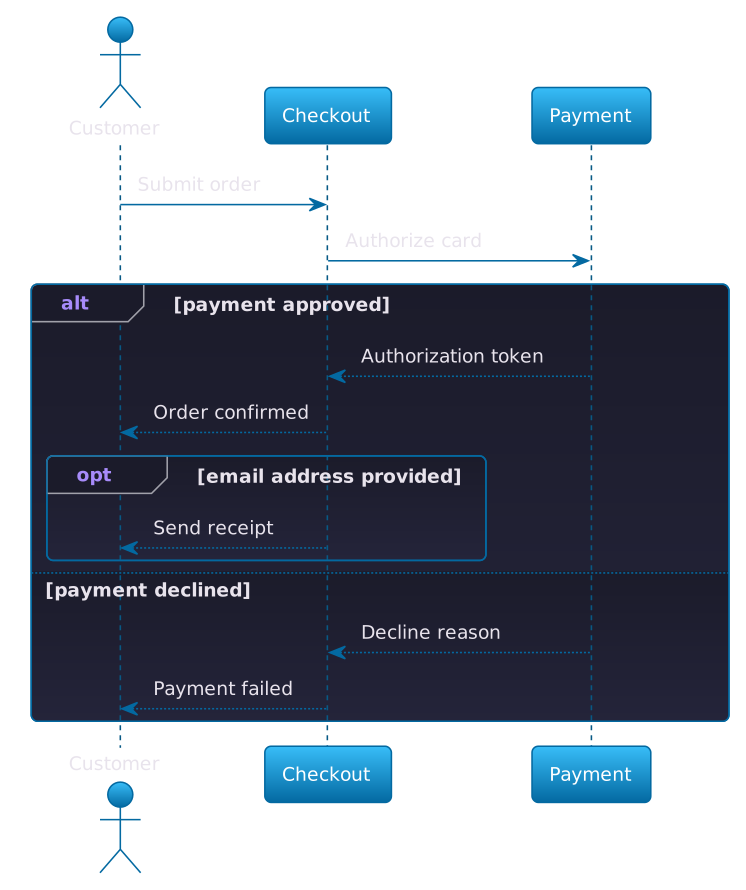
This example keeps the branch outcome close to the payment call that creates it. Inside the approved branch, it nests an opt fragment:
opt email address provided
Checkout --> Customer: Send receipt
endopt represents behavior that may happen but has no competing else path. It is effectively a one-branch conditional. If the absent case needs messages of its own, use alt instead.
A common mistake is putting every HTTP error into a separate branch. Include a branch when it changes the interaction, ownership, or outcome relevant to the reader. If three errors all produce the same retry message, one retryable failure branch may be more honest and far more readable.
Repetition with loop
Use loop when the same interaction repeats and the repetition itself matters:
loop for each pending reminder
Scheduler -> Notifications: Prepare reminder
Notifications -> Email: Send email
endThe text after loop should state the bound or condition: for each item, up to 3 attempts, or while status is pending. A label such as repeat adds almost no information.
@startuml
autonumber
participant Scheduler
participant "Notification service" as Notifications
participant "Email gateway" as Email

loop for each pending reminder
    Scheduler -> Notifications: Prepare reminder
    Notifications -> Email: Send email
    Email --> Notifications: Delivery accepted
end

note right of Notifications
    Failed deliveries enter the retry queue.
end note
@enduml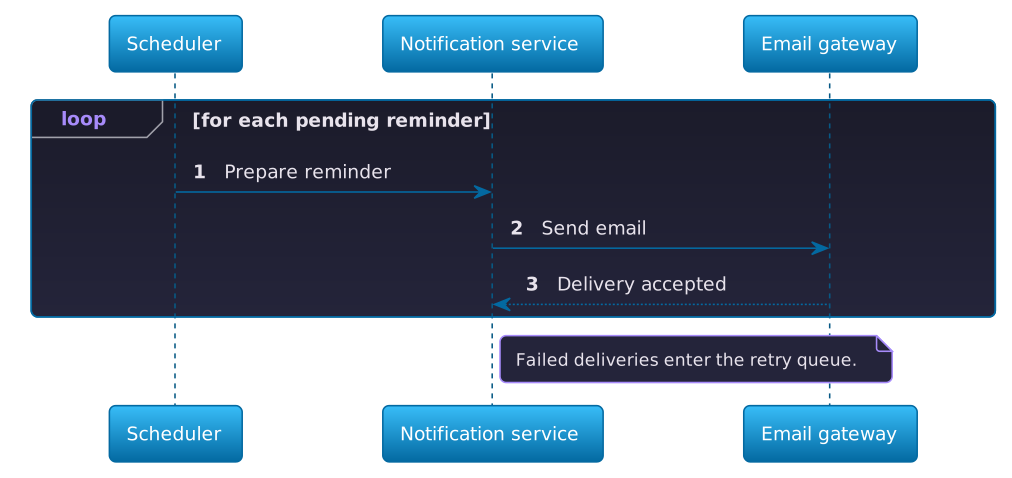
The example also uses two small features that make longer diagrams easier to discuss.
autonumber numbers messages in display order. Those numbers are useful in design reviews: “What happens if step 3 times out?” is quicker than “That arrow around the middle, no, the other one.” They are derived from source order, so inserting a message updates the sequence automatically.
A note attaches context without inventing another participant or message:
note right of Notifications
Failed deliveries enter the retry queue.
end noteKeep notes rare and local. If the diagram needs a wall of prose to explain every arrow, put the detailed policy beside the diagram and let the sequence remain scannable.
How to create a sequence diagram from scratch
The quickest reliable workflow is not “write perfect PlantUML from memory.” It is a short modeling loop.
1. Write one scenario as a sentence
Start with a concrete case: “A customer submits an order; checkout authorizes payment; a decline returns an error.” Avoid combining account creation, checkout, fulfillment, cancellation, and refunds in the first draft.
2. List only the participants needed for that scenario
Name the initiating actor, the component receiving the request, and the collaborators that change the result. Use aliases for long labels. Three to five participants is a comfortable starting range.
3. Add the happy-path messages from top to bottom
Write Sender -> Receiver: Intent one line at a time. Read the finished source aloud. If you have to move backward in time to explain it, reorder the messages.
4. Add only meaningful control flow
Use alt for outcomes that send the scenario down different paths, opt for one optional block, and loop for meaningful repetition.
5. Add activation bars when ownership is unclear
Reach for activate and deactivate when a long-lived operation matters. Use ++, -- and return for nested calls where the stack is easy to follow. Then check that every open activation is deliberately closed.
6. Open it in an online sequence diagram editor
Paste the source into Pumler or use any Open in editor link in this guide. The live preview catches syntax errors immediately and makes iteration faster than exporting an image after every change. Once the flow is correct, keep the text as the source of truth and generate the visual from it.
With a text-based sequence diagram editor, reordering steps means moving lines, renaming a participant means editing its declaration, and the layout updates automatically.
Common PlantUML sequence diagram mistakes
Leaving spaces in an unquoted participant name
Write participant "Order API" as Orders, not participant Order API. The alias becomes the stable source identifier.
Treating dotted arrows as enforced return semantics
--> changes appearance. It does not automatically bind the message to an earlier call or close an activation. Use a clear label and, when activation state matters, use return or an explicit deactivation.
Closing the wrong activation
With nested ++ calls, return unwinds the most recent activation first. If the output looks surprising, trace the activations as a stack. Use explicit activate and deactivate when that makes ownership clearer.
Forgetting end
alt, opt, and loop blocks all need end. Multi-line notes use end note. Consistent indentation makes a missing closer much easier to spot.
Modeling an entire system in one scenario
Large sequence diagrams usually fail gradually: one extra participant, one extra branch, one “important” background job at a time. Split by reader question. A checkout success/failure flow and a refund-retry flow can share participants without sharing a canvas.
Using implementation-shaped labels
POST /v1/orders can be useful in an API contract diagram. In an architecture discussion, Place order may communicate the intent better. Pick the level that matches the review and keep it consistent.
What to learn next
This tutorial covers the core PlantUML sequence diagram syntax: participants and aliases, messages, activation bars, return messages, and combined fragments. You also learned how to use alt, opt, loop, notes, and automatic numbering. PlantUML supports more controls and styling options for sequence diagrams than we need here.
When a real scenario calls for more, use the official PlantUML sequence diagram documentation as the reference. Add features because they clarify the interaction, not because the syntax catalog is there.
To create your own sequence diagram now, open one of the examples above in Pumler and replace its participants and messages with your own. Start with the happy path, render early, and add branches only after the basic story reads cleanly.
That is enough to go from a blank editor to a useful sequence diagram today—and enough restraint to keep the result useful next month.